True Tie: Tie Knot Guide
- 4.7
- Rating
- 50.00K
- Installs
- Free
- Price

 Analysis by App-foxy
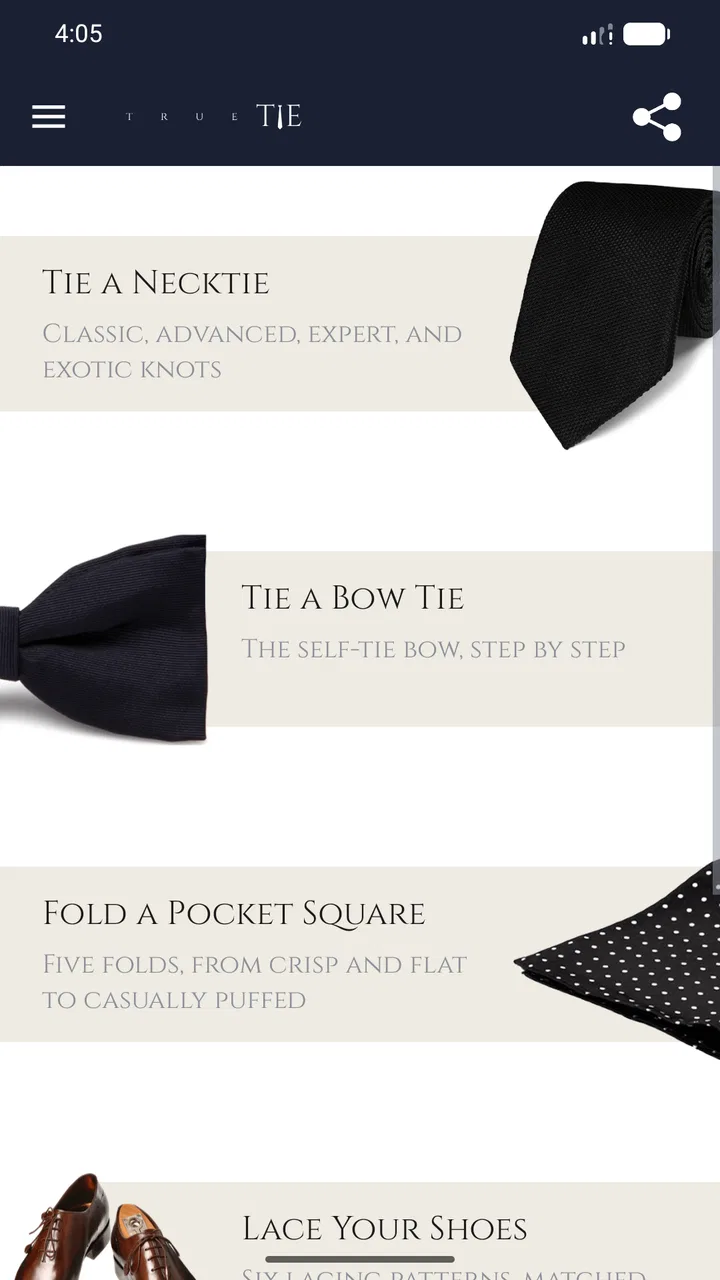
I usually think of tie tutorials as something you search for in a hurry, five minutes before leaving home, with one hand holding a shirt collar and the other trying to pause a video. True Tie: Tie Knot Guide takes a more focused approach. It is a free beauty and personal-style app from Twin Brothers Payam & Peyman that teaches tie knots, bow ties, scarf arrangements, and shoe-lacing patterns through visual steps. I found its value less in fashion inspiration and more in removing the awkward guesswork from small clothing tasks.
That makes it particularly interesting on a shared household device. One person can use it before work, another before a wedding, and someone else can open it when learning to tie a knot for the first time. It does not need to become a personal account or a long-term social tool to be useful. You open it for a practical lesson, follow the images, and put the phone down when the clothing is ready.
How True Tie works when several people use the same phone
The app’s main strength is its narrow purpose. Instead of mixing outfit shopping, trend articles, social feeds, and complicated personalization with the lesson itself, it keeps attention on the hands-on sequence. The store summary describes clear visual instructions that work offline, and that offline approach suits the situations where this kind of guide is most useful: a bedroom mirror, a hotel room, a dressing area, or a place with unreliable reception.
You May Also Like

 Blood Strike: 2.5 Anniversary
Blood Strike’s Loadouts Turn Every Drop Into a Tactical Gamble
A close look at Blood Strike’s custom loadouts: how fast access to signature weapons reshapes its battle royale rhythm, rewards preparation, and narrows the gap between fights.

 Pandora - Music & Podcasts
Pandora’s Music Is Easy to Start, but Harder to Recover
Pandora’s strength is its low-effort path from a seed to a station. Its weak spot is how much confidence it asks you to place in connection, setup, and quiet recovery.

 8 Ball Pool
 Is Built on Rivalries, Rematches, and Routine
A close look at the rivalries, rematches, shared routines, and unanswered safety questions that turn a quick pool match into a persistent mobile community.

 Samsung Music
’s Quiet Strength Is Playing What You Already Own
Its reach comes less from spectacle than from dependable access to a personal library. That simplicity is both the app’s strongest retention engine and its ceiling.

 AccuWeather: Weather Radar
AccuWeather Review: A Quick, Clear Forecast for Everyday Decisions
For everyday plans, the best forecast is the one you can understand quickly. AccuWeather makes rain timing, radar, and local conditions easy to act on, with a few trade-offs.

 Hill Climb Racing
Why Hill Climb Racing Still Turns Crashes Into One More Run
A tiny car, a bumpy hill and one more upgrade: Hill Climb Racing keeps resurfacing because its simple chaos makes every near-miss feel personal.
More From Our News Desk
View All News


In my experience, a shared-device scenario works best when the person who needs the lesson chooses the style first and then hands over the phone only when necessary. Someone learning a standard tie knot may want to study the whole sequence, while another person may already know the basics and only need to check the final fold. Because the app covers several types of tying, the household does not have to search separately for a bow-tie tutorial or a scarf guide.
There is also a useful distinction between learning and checking. A beginner can place the phone beside a mirror and copy each visual stage slowly. A more experienced user can treat the app as a reference card before an event. That second use is easy to overlook, but it is one reason a compact guide can be more convenient than a long video: you are not waiting for an introduction, an advertisement, or a presenter to reach the step you need.
The best shared-use habit is to treat the screen as a temporary dressing-room assistant, not as something that must stay open all day. Decide the knot or lacing style, follow the sequence, and close the app afterward. This keeps the experience simple for the next person and avoids turning a quick clothing task into a search session.
Why visual steps matter more than verbal explanations
Tying instructions are unusually difficult to describe with words alone. “Bring the wide end across” can sound clear until the fabric is in your hands and you cannot tell which side counts as the front. Visual guidance reduces that translation problem. You can compare the position of your own tie with the illustrated position rather than mentally converting a paragraph into movement.
That does not mean every learner will find the process effortless. Images can still be confusing if the fabric is twisted, the ends are held at different heights, or the phone is viewed from an unfamiliar angle. I recommend starting with the tie loosely arranged and keeping the phone at eye level. If the screen lies flat on a bed or table, the comparison becomes less natural because your hands and the illustration are oriented differently.
For a household, this also changes who can help whom. A parent, partner, or older sibling does not need to know every knot personally to support a beginner. They can hold the device, point to the next visual stage, and let the learner do the movement. That makes the app useful for coordination without requiring a dedicated teacher or a shared login.
Setup, boundaries, and everyday coordination
True Tie is an app rather than a service that depends on profiles or ongoing participation. I would therefore approach setup with modest expectations: install it, open the relevant guide, and learn how its visual navigation is organized. There is no reason to create a complicated household routine around it. Its role is closer to a reference booklet than a family platform.
This matters on a phone used by several people. A teenager preparing for a formal school event can use it for a bow tie, while an adult getting ready for work can use a necktie guide later. Nobody needs to hand over personal information or maintain a separate identity inside the lesson. The boundary is clear: the app teaches tying techniques, but it does not coordinate calendars, outfits, shopping, or event planning.
That limitation is worth recognizing before downloading. If you want a wardrobe organizer, a virtual stylist, or a service that remembers clothing preferences, this is not the right category of tool. It also will not replace a tailor’s advice about fit. A knot can be technically correct while still looking wrong because the tie is too short, the collar is unsuitable, or the fabric is too thick for the chosen style.
For shared use, I would establish a simple rule: the person wearing the item chooses the lesson, and the person helping does not take over the actual tying unless asked. This sounds minor, but beginners learn faster when they control the fabric. The app supplies the sequence; the household supplies patience and a mirror.
Offline access is practical, but it changes how you prepare
The offline aspect is one of the most useful details for real-world use. A formal event may take place in a venue with weak reception, and a traveler may not want to depend on mobile data while getting dressed. I would open the needed guide before leaving home and spend a moment checking that the lesson is easy to reach. That small preparation is better than discovering at the last minute that you are still trying to find the right section.
Offline use also makes the app more suitable for a shared family tablet or an older spare phone. A device can remain in a bedroom or hallway without needing to be connected to the household’s main account. The trade-off is that offline guidance cannot respond to your specific clothing problem. It can show the intended movement, but it cannot tell you that your tie length, collar shape, or fabric weight is making the result look uneven.
I found it helpful to use the guide in two passes. First, watch or inspect the complete sequence without moving the tie. Then restart and copy each stage. This prevents the common mistake of beginning immediately, getting stuck halfway through, and losing track of which loop was made first. With a shared device, the first person can also leave the next user a clear starting point by laying out the tie and selecting the appropriate lesson.
Coordinating before work, school, and formal events
A realistic household example would be a morning when one person has an interview and another has an event later that day. The interviewee can use a necktie lesson beside the mirror, while the second person checks a bow-tie sequence in advance. The app is most helpful when each person chooses a manageable style instead of attempting the most elaborate option under time pressure.
For a first attempt, I would avoid judging success only by speed. A knot that takes several tries but sits centered is more useful than a fast knot that slips or leaves the narrow end visible. The visual steps can help with order, but the final adjustment still depends on touch. Pull gently, check the collar, and look from the side as well as straight on.
Scarves and shoe lacing make the app more flexible than a tie-only reference. They also broaden the household audience. Someone who never wears formal neckwear may still want a scarf arrangement, while a child or teenager may be more interested in learning a lacing pattern. This wider range gives the app a practical place on a shared device rather than making it useful only to one person with a formal wardrobe.
There is a subtle coordination benefit here: people can learn different skills without needing the same level of experience. An adult may use the app as a quick reminder, while a younger user follows it as a first lesson. The app does not need to know who is using it because the household can adapt the pace, the clothing, and the amount of supervision.
Age context and trust in a family setting
The app carries an Everyone content rating, which fits its subject matter. It focuses on clothing techniques rather than mature themes, and that makes it comfortable to place within a family’s general collection of practical tools. Still, an age rating should not be confused with teaching quality for every age. A young child may understand the pictures but still need help handling a tight knot, sharp-edged accessories, or a shoe that must be fitted correctly.
I would let younger users practice with a loose, inexpensive item rather than a delicate tie or a scarf that might snag. The app can demonstrate the order of movements, but an adult should decide whether the material is suitable for practice. This is especially important with shared clothing: learning on someone else’s favorite accessory can create unnecessary tension if the fabric becomes wrinkled.
Trust is also easier when expectations stay realistic. True Tie is a guide, not a person watching the learner. It does not correct posture, detect a reversed step, or confirm that the final knot is appropriate for a particular collar. A parent can trust it as a visual reference while still checking the result. That combination is more sensible than leaving a beginner alone with an expensive garment simply because the app is easy to open.
For older users, the clear visual format may be more approachable than a fast online video. For people with limited dexterity or vision, however, the experience may require adjustments such as a larger screen, brighter lighting, or another person holding the phone. The app’s simplicity is helpful, but simplicity does not remove the physical demands of manipulating fabric.
What the app does better than common alternatives
The usual alternative is a web search followed by a video tutorial. Videos can be excellent when the presenter explains fabric orientation slowly, but they often include extra conversation and require repeated scrubbing. True Tie is better when you want a contained reference that stays focused on the movement. Its offline capability is another advantage over relying on a page or stream at the exact moment you are dressing.
On the other hand, a strong video may be better for learners who need to see a complete human demonstration from several angles. A static visual sequence can leave room for interpretation, especially with a bow tie or a scarf arrangement where the fabric’s front and back are easy to confuse. I would choose True Tie for quick, repeatable checking and a video for a first lesson that feels physically difficult.
Compared with a general fashion app, this guide is less distracting and more useful for a single task. You will not get broad outfit planning from it, and that is both its weakness and its identity. Compared with a printed diagram, it is easier to keep nearby and more convenient when the household already uses a phone, though a paper card has the advantage of never dimming or needing a battery.
Developer, availability, and practical expectations
Twin Brothers Payam & Peyman released the app on October 19, 2016, and it remains a focused tool rather than a trend-driven fashion product. It is currently at version 8.1 and requires Android 6.0 or later. That makes checking the phone’s operating-system compatibility worthwhile before planning to use it on an old spare device.
It is free, which suits its role as an occasional household reference. I would be comfortable installing it for a one-time event because there is no purchase decision standing between the user and the basic purpose of the app. The content rating is Everyone, and its audience is broad enough to include beginners, occasional formalwear users, travelers, and people who simply want to improve a practical skill.
The app has an average rating of 4.7 from around 1.1 thousand ratings, with over 50 thousand installs. Those figures suggest that its straightforward approach has found an audience, but I would not treat popularity as proof that every visual instruction will suit every learner. The real test is whether the chosen guide matches your fabric, your collar, your hand coordination, and the amount of time you have.
Small techniques that make the lessons more useful
One useful technique is to identify the front side of the fabric before starting. Many ties and scarves have a clear front and back, and losing track of that distinction can make the final result look inside out even when the movement order was correct. I recommend placing the item flat once, checking its orientation, and then beginning with the visual guide.
A second technique is to stop after each major crossing rather than trying to memorize the entire lesson. This is especially helpful on a shared phone because another person can act as a calm spotter, saying only “match the next picture” instead of giving competing instructions. It turns the app into a cooperation tool without pretending that it has built-in coaching.
A third is to practice the same style twice before an important occasion. The first attempt teaches the sequence; the second reveals whether the knot can be tightened evenly and centered under the collar. This is more valuable than collecting many knot styles. A household will usually benefit more from one dependable method for work or school and one method for formal events than from knowing several techniques poorly.
For shoe lacing, I would photograph the finished arrangement mentally rather than relying on memory of the crossing order alone. Lacing patterns can look correct from above while becoming uncomfortable inside the shoe. After following the guide, walk a little and check pressure points. The app can show the pattern, but comfort remains a personal fitting issue.
My household verdict after using the guide
I see True Tie as a practical, low-commitment reference for people who want visual help with everyday style tasks. It is especially good for a shared household where different people occasionally need help with ties, bow ties, scarves, or shoe lacing. The offline format makes it convenient in bedrooms, travel situations, and event venues, while the focused design keeps the user away from the noise of a general fashion search.
I would skip it if your main goal is outfit planning, personalized fashion advice, or a detailed video teacher who explains every movement from multiple camera angles. I would also avoid relying on it alone when the garment is expensive, the material is unusually slippery, or the user has difficulty manipulating fabric. In those cases, a patient person demonstrating the technique may be the better choice.
For everyone else, the app earns its place by solving a small problem cleanly. It does not need a family account, a social layer, or a complicated setup to help two people prepare for different occasions on the same device. My recommendation is to install it before you need it, try one simple guide with an ordinary item, and use the mirror to judge the final result. As a free visual companion for shared household use, True Tie is most successful when you treat it as a calm reference rather than a complete fashion adviser.
FAQs for True Tie: Tie Knot Guide
01What is True Tie: Tie Knot Guide, and what does it help you learn?
True Tie: Tie Knot Guide is a practical mobile app designed to teach users how to tie different necktie knots. It provides visual, step-by-step instructions that make each knot easier to understand, whether you are preparing for a formal event, starting a new job, or simply want to improve your everyday appearance. The app is especially useful for beginners who need clear guidance rather than complicated written explanations.
02Which tie knots can I learn with True Tie: Tie Knot Guide?
The app focuses on teaching a selection of popular tie knots, ranging from simple options suitable for everyday wear to more formal or decorative styles. Depending on the version and available content, users may find guides for classics such as the Four-in-Hand, Half Windsor, Full Windsor, and other variations. Each knot has its own shape, level of difficulty, and ideal occasion, allowing you to choose a style that matches your shirt and outfit.
03Is True Tie: Tie Knot Guide suitable for complete beginners?
Yes, the app is designed to be approachable for people who have little or no experience tying a necktie. Its visual instructions break the process into manageable stages, helping you follow the correct movement and direction of the fabric. You may need to pause and repeat some steps while practicing, but the straightforward presentation makes it considerably easier than trying to learn from a static diagram or a long written tutorial.
04Can I use True Tie: Tie Knot Guide without an internet connection?
Whether the app works fully offline depends on how its guides and images are stored on your device. Many of the instructional steps may remain available after installation, but features such as advertisements, updates, external links, or additional online content could require an internet connection. If you plan to use it while getting dressed away from home, open the app beforehand and confirm that the knot tutorials load correctly offline.
05Is True Tie: Tie Knot Guide free to download, and are there any limitations?
True Tie: Tie Knot Guide may be available as a free download, although the exact pricing model can vary between Android and iOS and may change with future updates. Free versions can include advertising, a limited selection of knot tutorials, or optional paid features. Before downloading, check the store listing for current in-app purchase details, supported devices, privacy information, and whether all instructional content is included without an upgrade.
Pros
- Clear step-by-step visuals make knot instructions easy to follow.
- Includes several classic knots for work
- formal events
- and casual outfits.
- Useful for beginners learning tie knots without needing outside guidance.
- Works as a handy reference when dressing for special occasions.
- Simple interface keeps attention focused on the instructions.
Cons
- Some knots may be difficult to follow on a small phone screen.
- Limited value for users who already know a few basic tie knots.
- Instructions may not cover every tie fabric
- length
- or collar style.
- Visual guidance can feel slower than watching a full video tutorial.
- May include ads or locked content depending on the app version.

True Tie: Tie Knot Guide
Gallery